 Reach
Test Relay path
Host에서 실제 TURN 할당을 시도합니다. 중계 서비스까지 닿는지 확인하지만, iPad까지의 전체 연결 성공을 뜻하지는 않습니다.Attempts an actual TURN allocation from Host. This checks reachability to the relay service, not the complete connection to your iPad.
REACH / CLOUDFLARE SETUP
중계 연결을 준비하거나, 이미 쓰는 중계의 사용량을 확인하세요. 목적에 맞는 토큰을 실제 발급 화면과 함께 안내합니다.Set up a relay connection, or add usage reporting to an existing relay. Follow the right token flow with real dashboard screenshots.
확인: 2026년 9월 22일 · Cloudflare와 Reach Host의 화면 이름은 버전에 따라 다를 수 있습니다.Checked September 22, 2026 · Cloudflare and Reach Host labels may vary by version.
필요한 작업을 고르면 아래 권한과 입력 위치가 바뀝니다. 토큰은 Mac의 Reach Host에만 입력하세요.Choose a task to see the permissions and fields you need. Enter the token only in Reach Host on your Mac.
Calls: Edit와
Account Analytics: Read를 추가합니다.Prepare your
Account ID and one account API token, with
Calls: Edit and
Account Analytics: Read.
Account Analytics: Read만 필요합니다. 기존
TURN 키는 그대로 둡니다.Prepare the
the ID of the account that owns your TURN key, plus a read-only API token for that account. Only Account Analytics: Read is needed. Keep
the existing TURN key.
Cloudflare에 로그인하고 사용할 계정을 선택하세요. Account ID를 복사해 둡니다. 계정 이메일, Zone ID, TURN 키 ID와 다른 값입니다.Sign in to Cloudflare and select your account. Copy its Account ID; this is different from your email, Zone ID, or TURN key ID.
대시보드 검색(⌘K)에서 Copy account ID를 찾아 복사하고 Host의 Account ID 입력란에 먼저 붙여 두세요. 이후 Manage Account → Account API Tokens → Create Token을 엽니다.Find Copy account ID in dashboard Search (⌘K), then paste it into the Account ID field in Host first. Then open Manage Account → Account API Tokens → Create Token.
이름은 Reach Host Relay처럼 알아보기 쉽게 정하고
Start from scratch(처음부터 시작)를
선택하세요.Use a recognizable name such as
Reach Host Relay, then select
Start from scratch.
이름은 Reach Host Usage로 정하고
Start from scratch(처음부터 시작)를
선택하세요.Name it Reach Host Usage and choose
Start from scratch.
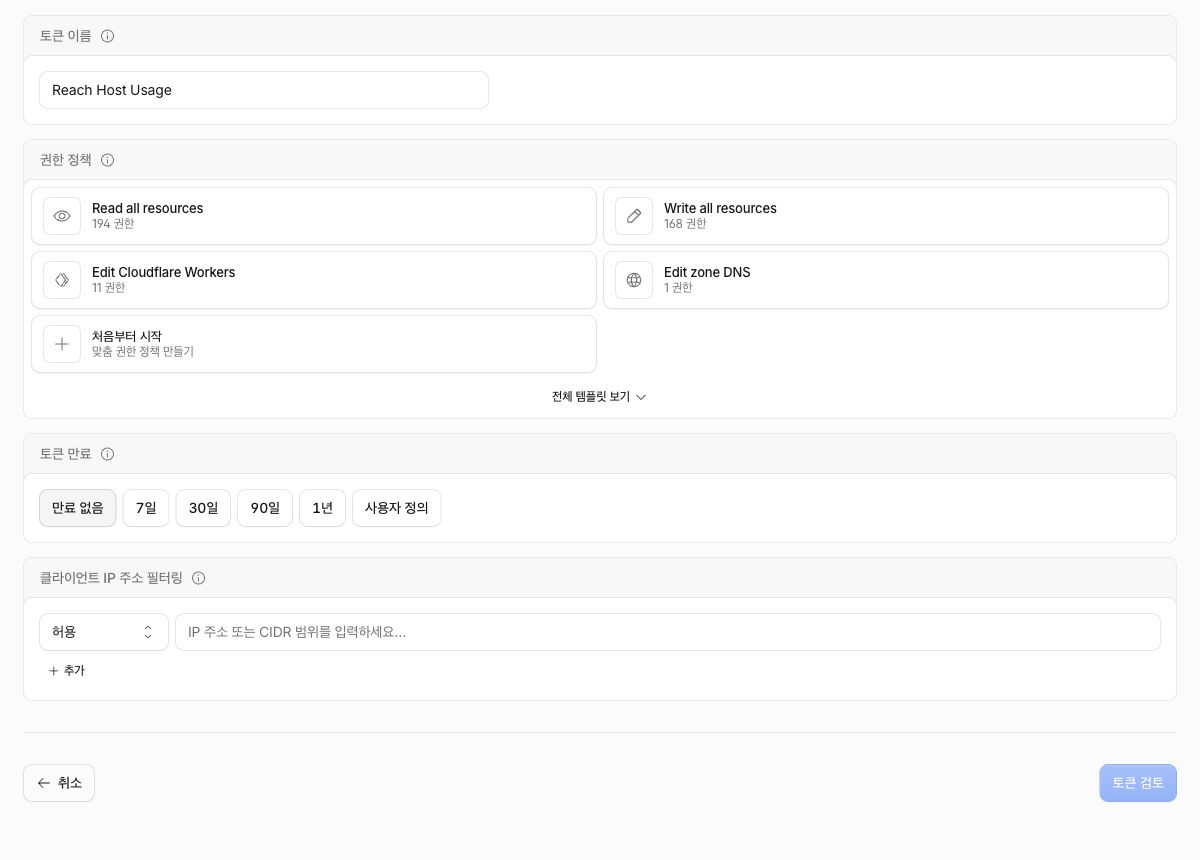
공식 문서: Account ID 찾기 ↗Official guide: find your Account ID ↗
공식 문서: 계정 API 토큰 만들기 ↗Official guide: create an account API token ↗
두 권한을 선택합니다.
Media → Calls → Edit는 Host의 TURN 키 생성에,
Analytics & Logs → Account Analytics → Read는
사용량 조회에 쓰입니다.Select both permissions.
Media → Calls → Edit lets Host create the TURN
key;
Analytics & Logs → Account Analytics → Read
allows usage queries.
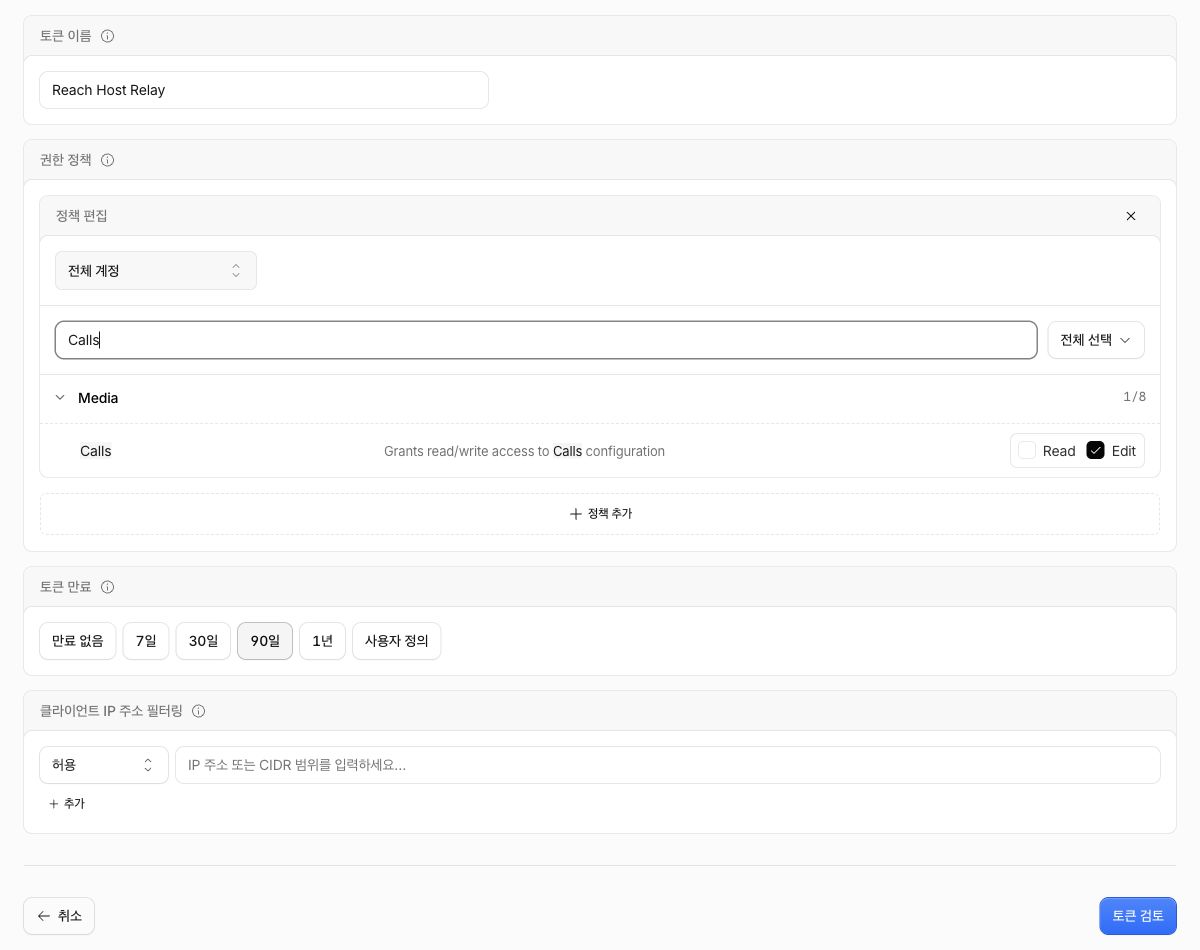
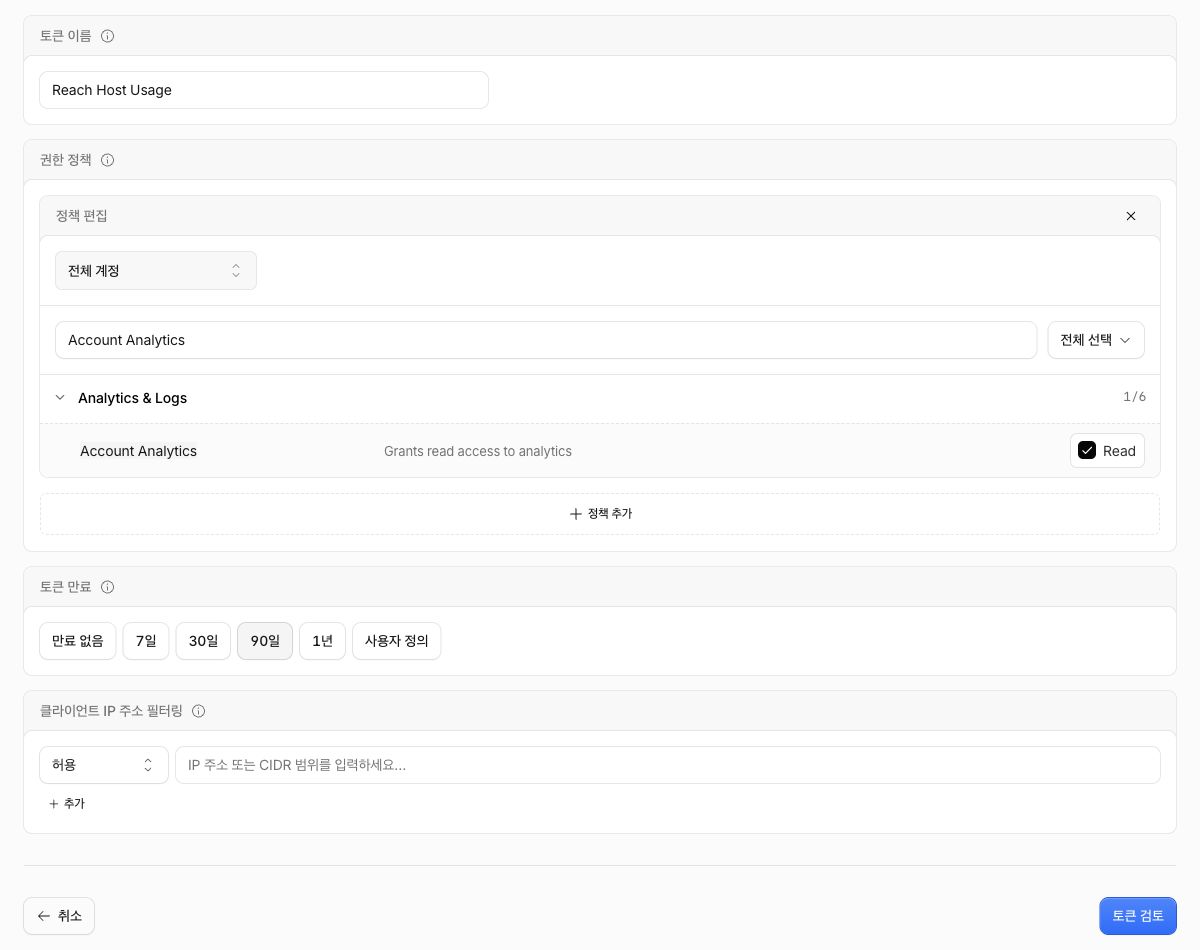
읽기 전용 권한 하나만 선택하세요:
Analytics & Logs → Account Analytics → Read.
사용량만 조회한다면 Calls: Edit는 필요
없습니다.Select just
Analytics & Logs → Account Analytics → Read.
Calls: Edit is not needed for usage-only
access.
공식 문서: TURN 키 생성 권한 ↗Official docs: TURN key creation permission ↗
공식 문서: 사용량 조회 권한 ↗Official docs: analytics read permission ↗
이름, 계정 범위, 권한, 만료를 확인한 뒤 토큰을 만드세요. 만료일은 운영 방식에 맞게 선택하세요. 예시의 90일을 그대로 사용할 필요는 없습니다. Reach는 계정 API 토큰을 자동 갱신하지 않으므로 만료 전에 새 토큰으로 교체하세요.Review the name, account scope, permissions, and expiry before creating the token. Choose an expiry that fits your setup; the example’s 90 days is optional. Reach does not renew account API tokens automatically, so replace the token before it expires.

필수는 아닙니다. Host가 사용하는 인터넷 출구 IP를 확실히 아는 경우에만 제한하세요. 회사망·핫스팟 전환 등으로 IP가 바뀌면 토큰 호출이 거부될 수 있습니다.It is optional. Restrict it only when you know the Host’s public egress IP. Switching networks or hotspots can change that address and block token requests.
공식 문서: 만료와 IP 제한 ↗Official docs: expiry and IP restrictions ↗
Reach Host 상태 화면 → Cloudflare 릴레이 → 설정…을 엽니다. Cloudflare 관리 → Cloudflare 계정 API 토큰에서 값을 입력하세요.Open Reach Host status → Cloudflare relay → Set up…. Enter the values under Cloudflare settings → Cloudflare account API token.
선택한 Cloudflare 계정 식별자Your selected Cloudflare account identifier
방금 발급한 비밀 토큰 값The secret token value you just created
계정 토큰 저장(Save account token)을 누르고 TURN 키 생성 완료 메시지를 확인하세요. Host가 키를 자동으로 만듭니다. 임시 TURN 사용자 이름·암호나 수동 TURN 키를 따로 만들 필요는 없습니다.Select Save account token and confirm the TURN key creation success message. Host creates the key automatically. You do not need a separate manual TURN key or temporary TURN username and password.
Reach Host 상태 화면 → Cloudflare 릴레이 → 관리… → Cloudflare 관리 → 사용량 설정을 엽니다. 분석 계정 및 읽기 전용 토큰에서 아래 값을 입력하세요.Open Reach Host status → Cloudflare relay → Manage… → Cloudflare settings → Usage settings, then Analytics account and read token.
현재 TURN 키가 속한 계정The account that owns the current TURN key
Account Analytics: Read 토큰Your Account Analytics: Read token
분석 자격 증명 저장(Save analytics credentials)을 누릅니다. 기존 TURN 키 ID·키는 변경하지 않습니다.Select Save analytics credentials. Leave the existing TURN key ID and secret unchanged.
자격 증명은 Mac의 Keychain에 저장됩니다. Viewer에는 계정 API 토큰이나 TURN 키를 입력하지 않습니다.Credentials are stored in the Mac Keychain. Do not enter the account API token or TURN key in Viewer.
Host에서 실제 TURN 할당을 시도합니다. 중계 서비스까지 닿는지 확인하지만, iPad까지의 전체 연결 성공을 뜻하지는 않습니다.Attempts an actual TURN allocation from Host. This checks reachability to the relay service, not the complete connection to your iPad.
읽기 전용 사용량 조회 활성화를 켜고 기간·범위를 선택한 뒤 사용량 새로고침(Refresh usage)을 누릅니다. 저장하거나 기간을 바꾸는 것만으로 조회하지 않습니다.Turn on Enable read-only usage queries, select the period and scope, then select Refresh usage. Saving credentials or changing the period does not run a query.
기간은 최근 30일 / 이번 달 / 사용자 지정으로 고릅니다. 월·사용자 지정 날짜 경계는 UTC 기준입니다. 사용량 막대는 Cloudflare의 송신·수신 트래픽 비교이며, 무료 할당량 잔액이나 청구서가 아닙니다.Choose Last 30 days / This month / Custom. Month and custom boundaries use UTC. Bars compare Cloudflare egress and ingress traffic; they are not a free-quota balance or an invoice.
수치는 제공자의 집계 지연이나 선택한 계정·키 범위에 따라 달라질 수 있습니다. 요금과 실제 청구액은 Cloudflare 대시보드에서 확인하세요.Provider reporting delays and the selected account or key scope can affect the result. Check pricing and actual charges in the Cloudflare dashboard.
계정 ID와 토큰이 같은 계정인지, 토큰이 만료·폐기되지 않았는지 확인하세요. 처음 중계 설정에는 Calls: Edit, 사용량에는 Account Analytics: Read가 필요합니다. IP 필터가 Host의 현재 인터넷 IP를 차단하지 않는지도 확인하세요.Check that the token belongs to the selected account and is neither expired nor revoked. Initial relay setup needs Calls: Edit; usage reporting needs Account Analytics: Read. Check whether an IP filter excludes the Host’s current public address.
조회 권한과 중계 경로는 별개입니다. Test Relay path 결과, 두 기기의 Reach 로그인 상태, 네트워크 제한을 확인하세요. 사용량 조회 성공은 영상·입력 연결 성공을 보장하지 않습니다.Analytics permission and relay reachability are separate. Check Test Relay path, Reach sign-in on both devices, and network restrictions. A successful usage query does not establish a video or input session.
아닙니다. Host는 TLS 443 경로도 시도하지만 Viewer 쪽에는 UDP 통신이 필요합니다. HTTP 전용 프록시나 회사·학교의 방화벽 정책에 따라 연결이 제한될 수 있습니다.No. Host also tries TLS 443, but Viewer still needs UDP connectivity. HTTP-only proxies and company or school firewall policies can prevent the connection.
Cloudflare 계정 소유 토큰을 만들거나 수정하려면 해당 계정의 Super Administrator 역할이 필요합니다. 관리자에게 필요한 권한만 포함한 토큰을 요청하세요. 토큰에 전체 관리자 권한을 주라는 의미가 아닙니다.Creating or editing account-owned Cloudflare tokens requires the account’s Super Administrator role. Ask an administrator for a narrowly scoped token; do not grant the token all administrator permissions.
관리… → 계정 토큰 변경에서 새 토큰을 저장하세요. 사용량 전용 토큰은 사용량 설정 → 분석 계정 및 읽기 전용 토큰에서 교체합니다. 계정 토큰이 만료되어도 이미 만들어진 TURN 키가 함께 폐기되지는 않습니다.Save a replacement under Manage… → Change account token. Replace a usage-only token under Usage settings → Analytics account and read token. Expiry of the account token does not revoke an existing TURN key.
Host의 계정 토큰 삭제는 저장된 토큰과 Reach가 자동 생성한 로컬 TURN 키를 제거합니다. 수동으로 입력한 TURN 키는 그대로 둡니다. Cloudflare 측 API 토큰과 TURN 키의 폐기는 Cloudflare에서 별도로 진행하세요.Deleting the account token in Host removes the stored token and any local TURN key created by Reach. A manually entered TURN key is kept. Revoke the Cloudflare-side API token and TURN key separately in Cloudflare.
공식 문서: TURN 키와 임시 자격 증명 ↗Official docs: TURN keys and temporary credentials ↗
429는 조회 제한입니다. Host에 표시된 재시도 시각 이후 새로고침하세요. 기록이 없으면 조회 기간과 계정·TURN 키 범위를 확인하세요. 기록 없음은 사용량이나 청구액이 0이라는 뜻이 아닙니다.429 means the request was rate limited; refresh after the retry time shown in Host. If there are no records, check the period and account or TURN key scope. No records does not prove zero usage or charges.